
SSL certificate monitoring connects to your server the way a browser does, reads the certificate it presents and checks its expiry date, chain of trust, host name and TLS version. It warns you days or weeks before the certificate runs out and marks the check down the moment visitors would see a certificate error.
Key takeaways
- Most certificate outages are not caused by missing renewals but by renewals that fail silently or are installed on the wrong server.
- Monitor what the server actually presents, not what your certificate dashboard says it bought or issued.
- A dedicated SSL monitor checks expiry, chain trust, host name match and the negotiated TLS version on any port.
- A warning window of 14 to 30 days gives you time to fix a failed renewal before visitors notice.
- Shrinking certificate lifetimes mean more renewals each year, and each renewal is a chance for something to go wrong.
Why certificates still break websites
Automatic renewal solved the "somebody forgot" problem for many sites, but it created a quieter one: renewal jobs that stop running. A DNS change breaks domain validation, a firewall rule blocks the validation request, a server is rebuilt without the renewal timer, or the new certificate is issued correctly but never reloaded by the web server. In each case the certificate your visitors see keeps counting down while everything looks fine from the inside.
Lifetimes are also getting shorter. Let's Encrypt certificates currently last 90 days, and the CA/Browser Forum has voted to reduce the maximum lifetime of publicly trusted certificates in steps: 200 days from March 2026, 100 days from March 2027 and 47 days from March 2029. More renewals per year means more chances for one of them to fail.
The failures an SSL check should catch
| Problem | What visitors see | How the check reports it |
|---|---|---|
| Certificate expired | A full-page browser warning | Down: "Certificate expired on …" |
| Certificate close to expiry | Nothing yet | A daily SSL expiry alert inside your warning window |
| Wrong certificate for the host name | A name mismatch warning | Down: "Certificate does not match hostname …" |
| Missing intermediate or untrusted issuer | Errors in some browsers, apps and API clients | Down: "Certificate not trusted: …" |
| Old protocol negotiated | Blocked by strict clients | Down when below your Minimum TLS version |
| Handshake fails entirely | Connection error | Down: "SSL connect failed: …" |
Two ways to watch a certificate in AllInOneMonitor
The certificate option on an HTTP(S) monitor
If you already watch a website, open the monitor's edit page and tick Watch the SSL certificate of this URL too in the Certificate card. The certificate is read during the normal request, its expiry date is stored and you get an expiry warning the number of days you choose (1 to 90, 14 by default). This is the quickest way to cover a website you already monitor. Setting that up is covered in our website uptime monitoring guide.
A dedicated SSL monitor
The SSL monitor type is built for certificates. It connects with TLS and SNI to the host and port you give, then checks validity, chain trust, host name match, expiry, issuer, subject names and the TLS version. Use it when:
- the certificate sits on a port other than 443, such as a mail server on 465 or 993, or an admin panel on 8443;
- you want a minimum TLS version enforced;
- you want certificate problems tracked separately from availability, with their own incident and history;
- several host names share one server and each needs its own check.
Mail servers that upgrade with STARTTLS (ports 25 and 587, for example) are better covered by the SMTP, IMAP and POP3 monitors, which perform the STARTTLS step and also raise SSL expiry warnings for the certificate they find. See database and mail server monitors.
How to monitor SSL certificate expiry, step by step
- Open Monitors and click Add monitor.
- Choose SSL in the What to monitor card.
- In Basics, enter a Name such as "SSL shop.example.com" and the Host (just the host name, without
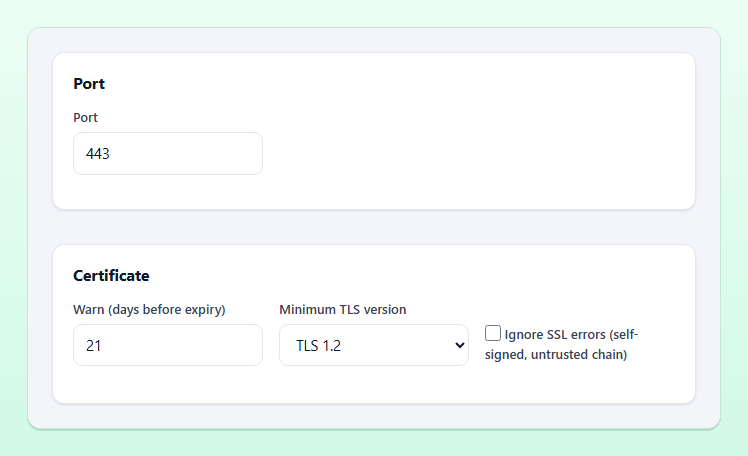
https://). - In the Port card, leave 443 for a website or enter the port of the service you want to check.
- In the Certificate card, set Warn (days before expiry). Choose a window longer than your renewal job's retry period: if renewal is attempted 30 days before expiry, a 21-day warning tells you that it failed.
- Set Minimum TLS version to TLS 1.2 or TLS 1.3 if you want older protocols to count as a failure. Leave it on Any to only record the version.
- Only tick Ignore SSL errors (self-signed, untrusted chain) for internal certificates you know are self-signed. On a public site it hides exactly the problems you want to hear about.
- Decide whether you want Treat "expires soon" as down (otherwise it is a warning alert). Most teams leave it off: the certificate still works, so a warning is the honest signal.
- Choose the alert channels, click Test now to see what the server presents, and then Create monitor.
Tip: SSL checks need a daily rhythm, not a 30-second one. Certificates change rarely, so an interval of an hour is plenty for an expiry check. Keep the fast intervals for availability monitors.
What the SSL expiry alert looks like
Once the certificate enters your warning window, the monitor raises an SSL certificate expiring alert at most once a day per monitor. In the last three days before expiry the alert is sent with critical severity. Each alert lands in the bell of every organisation member, is sent as the monitor.ssl_expiry webhook event and goes to every channel mapped to the monitor that takes that event.
That daily repetition matters. A single warning e-mail sent four weeks ahead is easy to file and forget; a daily reminder that turns critical near the end is much harder to ignore. If the certificate does expire, the monitor turns Down, an incident opens and the normal down alert goes out.
Channels can be restricted to certain events. A common setup sends SSL certificate expiring and Domain expiring to an operations mailbox or a Slack channel, and keeps SMS for real outages. Event filters and channel options are described in the alerts documentation.
Reading the SSL monitor page
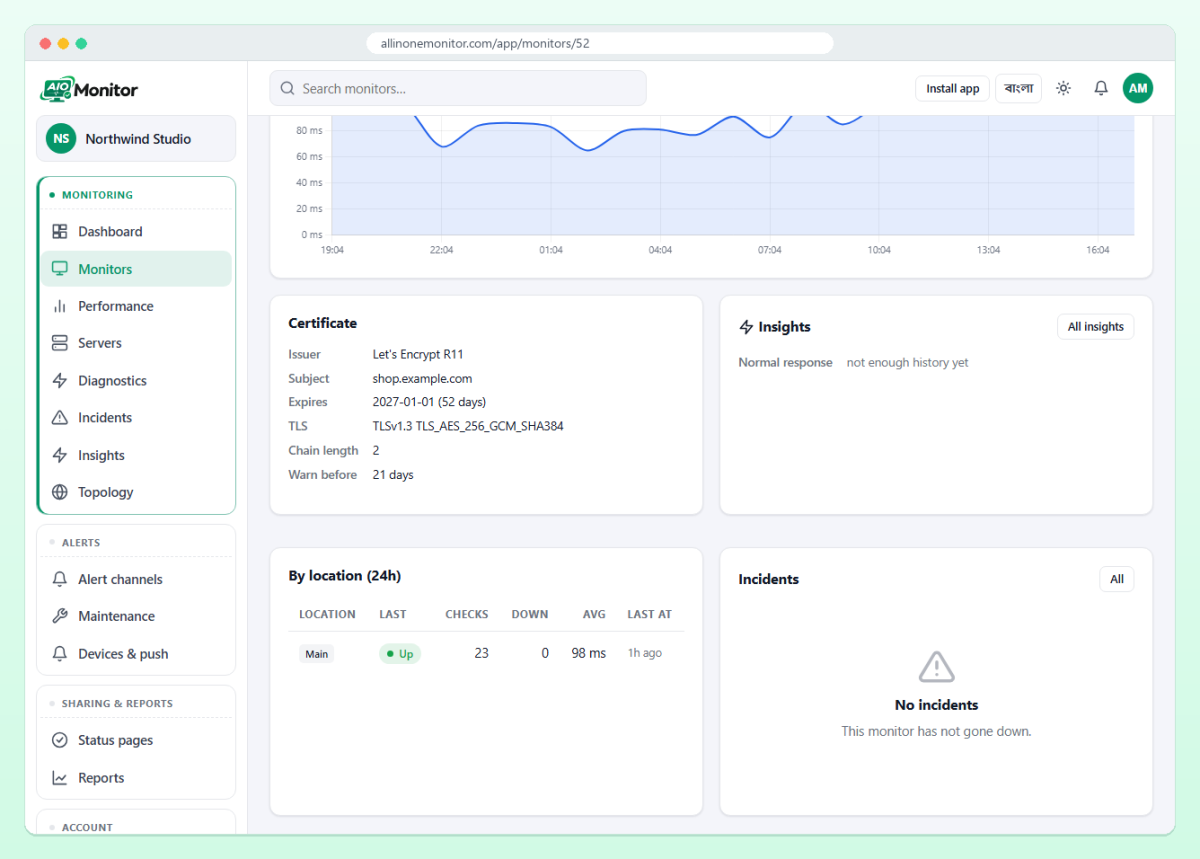
The monitor page shows a Certificate card with the issuer, the subject, the expiry date with the days left, the negotiated TLS version and cipher, the chain length and your warning setting. The uptime figures and the results list work as they do for any other monitor, so you can see exactly when a certificate problem started and ended.
Certificate chain problems
A server must send its own certificate plus the intermediate certificates that link it to a trusted root. Some browsers quietly fetch a missing intermediate, so the site looks fine on your laptop, while command-line tools, mobile apps and API clients fail. An SSL monitor verifies the chain with a standard trust store, so an incomplete chain shows up as a trust failure. The Chain length on the monitor page is a quick sanity check after you install a new certificate: if it suddenly drops, the intermediate is probably missing.
TLS version checks
TLS 1.0 and 1.1 are deprecated, and many clients and payment providers refuse them. Setting Minimum TLS version turns an accidental downgrade, for example after a load balancer change, into a Down result with a message such as "Negotiated TLSv1.1, required at least TLSv1.2".
What an SSL check does not do
It reads what the handshake gives: expiry, chain trust, host name and TLS version. It does not grade cipher suites or test OCSP stapling or HSTS. Those belong to a periodic security scan; certificate monitoring is about the problems that take a site offline. The known limitations page lists this openly.
A checklist for certificate monitoring
- One SSL monitor per public host name that has its own certificate, including
wwwand API subdomains. - Monitors for non-web TLS services: mail, admin panels, custom ports.
- A warning window longer than your renewal retry period.
- A minimum TLS version that matches your security policy.
- A domain expiry monitor too, because a lapsed domain takes the certificate down with it. Our guide to domain expiry monitoring covers that side.
Frequently asked questions
How many days before expiry should an SSL alert start?
Start the warning before your automatic renewal would normally have succeeded, so the alert means "renewal failed" rather than "renewal is scheduled". For 90-day certificates renewed 30 days ahead, a warning window of 14 to 21 days works well.
Can I monitor a certificate on a port other than 443?
Yes. The SSL monitor has a Port field, so you can check implicit-TLS services such as 465, 993 or 8443. For STARTTLS mail ports, use the SMTP, IMAP or POP3 monitors.
Will the check fail for a self-signed certificate?
Yes, as untrusted, unless you tick "Ignore SSL errors (self-signed, untrusted chain)". Expiry and host name are still checked.
Does an expiring certificate count as downtime?
Not by default: it raises a daily warning alert. Tick "Treat expires soon as down" if you want the warning window itself to count as Down.
Never meet an expired certificate again
Add an SSL monitor for each host name and get a daily reminder long before visitors see a warning. See every monitor type on the features page.