
Domain expiry monitoring looks up your domain in the registry on a schedule, reads its expiry date, registrar, status and nameservers, and alerts you every day once the expiry date comes close. It also flags dangerous registry states, such as redemption or a hold, and can check that the domain still points at the nameservers you expect.
Key takeaways
- When a domain lapses, everything that depends on it stops: website, e-mail, APIs and certificate renewals.
- Auto-renew is not a guarantee: expired cards, closed accounts and transfers break it without warning.
- RDAP is the modern, structured way to read registry data; WHOIS on port 43 is the fallback for TLDs without RDAP.
- Watch the domain status and the nameservers too, not only the expiry date.
- A daily alert inside a 30 to 60 day window gives finance, the registrar and IT time to act.
Why domains still expire by accident
Few teams decide to let a domain go. It happens because the renewal depends on things nobody watches: the card on file at the registrar expired, the reminder e-mails go to someone who left the company, the domain sits in a personal account, or a transfer between registrars reset the auto-renew setting. The registrar does send notices, but they go to the registrant contact, which is often out of date.
The impact is wide. A domain is a single point of failure for the website, every subdomain, inbound and outbound e-mail, API endpoints, single sign-on callbacks and certificate validation. Uptime monitors will notice when the site disappears, but by then you are already in recovery mode. Domain expiry monitoring warns you weeks earlier, while a renewal is still a two-minute job.
What happens after a domain expires
The exact rules depend on the TLD and the registrar. For many generic TLDs such as .com, an expired domain first enters a grace period in which the registrar can still renew it, often with the website and e-mail already switched off. After that comes a redemption period of about 30 days, where restoring the domain usually costs an extra fee, followed by about five days of "pending delete" before the name is released. Country-code TLDs can follow quite different rules. None of these stages is a place you want to be.
How domain expiry monitoring works: RDAP and WHOIS
The Domain monitor type in AllInOneMonitor looks up the registrable domain through RDAP, the registries' JSON service, and falls back to WHOIS on port 43 for TLDs that do not offer RDAP. If you enter a subdomain such as www.example.com, it looks up example.com. From the answer it stores:
- the expiry date and the days left;
- the registrar;
- the domain status codes;
- the nameservers listed in the registry record.
When the monitor turns Down
| Situation | Result |
|---|---|
| Expiry date inside your warning window | Up, with a daily "Domain expiring" alert |
| Domain has expired | Down: "Domain expired on …" |
| Status contains redemption, pending delete, client hold or server hold | Down, with the status in the message |
| Domain is not registered | Down: "Domain … is not registered" |
| An expected nameserver is missing from the registry record | Down, listing the nameservers actually found |
| Registry publishes no expiry date | Up, with a note saying so |
The hold statuses deserve attention. A registrar or registry can put a domain on hold for unpaid fees, an unverified contact address or an abuse report, and a held domain stops resolving even though it has not expired.
Set up a domain expiry monitor step by step
- Open Monitors and click Add monitor.
- Choose Domain in the What to monitor card.
- In Basics, give the monitor a Name such as "example.com domain" and enter the domain as the Host.
- Choose a relaxed Check interval. Registry data changes slowly and some registries rate-limit WHOIS, so an hourly check is plenty.
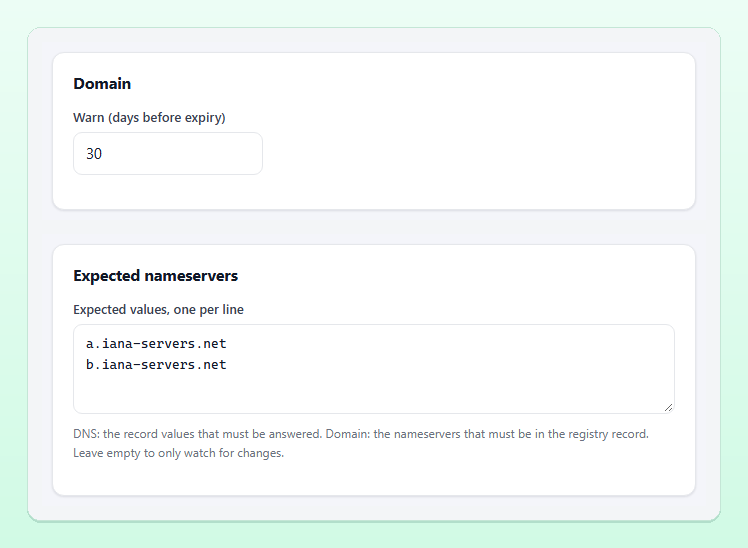
- In the Domain card, set Warn (days before expiry). Any value from 1 to 365 days works; the default is 30.
- In the Expected nameservers card, list the nameservers the domain must use, one per line (for example
ns1.example.net). Leave it empty if you only care about the expiry date. - Decide on Treat "expires soon" as down (otherwise it is a warning alert). Leave it off if you want a daily warning, tick it if your team only reacts to red.
- Pick the alert channels and click Create monitor.
Tip: Choose the warning window around your company's slowest process, not the renewal itself. If a renewal needs a purchase order or a new card from finance, 60 days is safer than 30.
The domain expiration alert
Once the expiry date is inside your warning window, the monitor raises a Domain expiring alert once a day. In the last seven days the alert is marked critical. It appears in the notification bell, goes out as the monitor.domain_expiry webhook event and is sent to each channel mapped to the monitor that takes that event.
Because the alert repeats daily until the date moves, it works as a gentle escalation: the first message is a reminder, the twentieth is a problem. Many teams send expiry alerts to a shared mailbox or a team chat channel, where someone from finance or management can see them too, instead of to the on-call phone. The alerts documentation shows how to limit a channel to certain events.
On the monitor page, the Domain card shows the registrar, the expiry date with the days left, the nameservers, the status codes and your warning setting. It is a quick place to confirm a renewal went through: after renewing, run Test on the monitor page and the new date appears.
Nameserver change monitoring
Nameservers decide who answers DNS for your domain. An unexpected change can mean a migration someone forgot to announce, a mistake during a registrar transfer, or, in the worst case, a hijacked registrar account. There are two complementary ways to watch for it.
Expected nameservers on the Domain monitor
The Expected nameservers list is compared with the registry record. Every name you list must be present; if one is missing, the monitor turns Down and the message lists the nameservers it actually found. Because this reads the registry, it catches changes made at the registrar level, which is exactly where a hijack happens.
An NS record check on a DNS monitor
A DNS monitor with the record type set to NS resolves the nameservers through DNS. With expected values it fails when they differ, and without expected values it raises a DNS record changed alert whenever the answer changes (at most once an hour). Our guide to DNS monitoring and record changes explains the options, including asking a specific resolver.
A domain portfolio checklist
- Every domain that serves traffic or receives mail, including old brand names that only redirect.
- Defensive registrations and typo domains, if losing them would let someone else impersonate you.
- Domains used only for e-mail or APIs, which uptime checks on the website will never cover.
- Expected nameservers on the domains that matter most.
- An SSL monitor for each host name on those domains; see SSL certificate monitoring.
Monitors can be grouped and tagged on the form's Organise card, so a "Domains" group keeps the portfolio together on the monitors list.
Limits worth knowing
Domain checks depend on what each registry publishes. Some country-code registries publish no expiry date at all; the check then says so and stays Up, so for those domains keep a calendar reminder as well. Some WHOIS servers rate-limit lookups, which is another reason to keep the interval long. These points are listed on the known limitations page.
Frequently asked questions
What is the difference between RDAP and WHOIS?
Both return registration data. RDAP is the newer protocol: it answers in structured JSON over HTTPS, while WHOIS returns free-form text on port 43 that varies between registries. The Domain monitor uses RDAP first and WHOIS as the fallback.
How far ahead should a domain expiration alert start?
Thirty days is a reasonable minimum. If renewing needs approval or payment from another department, start at 60 days; the warning can be set anywhere from 1 to 365 days.
Can I monitor a subdomain's expiry?
Subdomains do not expire on their own; the registered domain does. If you enter a subdomain, the monitor looks up its registrable domain.
How many domains can I monitor?
Each domain is one monitor, and the number of monitors depends on your plan. See the pricing page for current plans.
Keep every domain renewed
Add a Domain monitor for each name you own and get a daily reminder well before the registry starts counting down.