
To get an SMS alert when your website is down, add an uptime monitor for the site, create an SMS alert channel with your phone number in international format, and attach that channel to the monitor. When the check confirms the site is down, a short text with the monitor name, the error and a link is sent to your phone, and a second one follows when it recovers.
Key takeaways
- SMS reaches you when there is no data connection, no app open and no laptop nearby, which is why it suits on-call alerts.
- In AllInOneMonitor, SMS works once the operator has configured an SMS provider and your plan includes SMS alerts.
- Enter numbers in international format, such as
+8801XXXXXXXXXfor a Bangladeshi mobile. - Limit an SMS channel to down and recovery events, and use Cooldown (seconds) to cap the cost of a flapping monitor.
- Pair SMS with a free channel such as e-mail or chat, so the details live somewhere you can search later.
Why SMS still matters for downtime alerts
E-mail, Slack and Telegram are cheaper and richer, but they all depend on a working data connection and an app that is allowed to notify you. SMS travels over the mobile network's own signalling, rings even on a basic phone, and is hard to miss. For the one alert that means "customers cannot reach the site right now", that reliability is worth a few cents.
The trade-off is cost and length. Every message is paid for, and a text is short, so SMS should carry only the alerts that need action, not every warning the platform can produce. The rest of this guide is about getting that balance right.
What you need before you start
- A monitor for the website. An HTTP(S) or Keyword monitor is the usual choice; our website uptime monitoring guide covers the setup.
- SMS on your plan. SMS alerts are a plan feature. If your plan does not include them, saving an SMS channel is refused with SMS alerts are not part of your plan. The pricing page shows which plans include SMS and WhatsApp alerts.
- An SMS provider configured by the operator. The platform sends texts through a provider the operator sets up: RT Communications (a Bangladeshi gateway), Twilio, Vonage, Textbelt, or any custom HTTP gateway. You do not need your own provider account.
Setting up an SMS alert channel
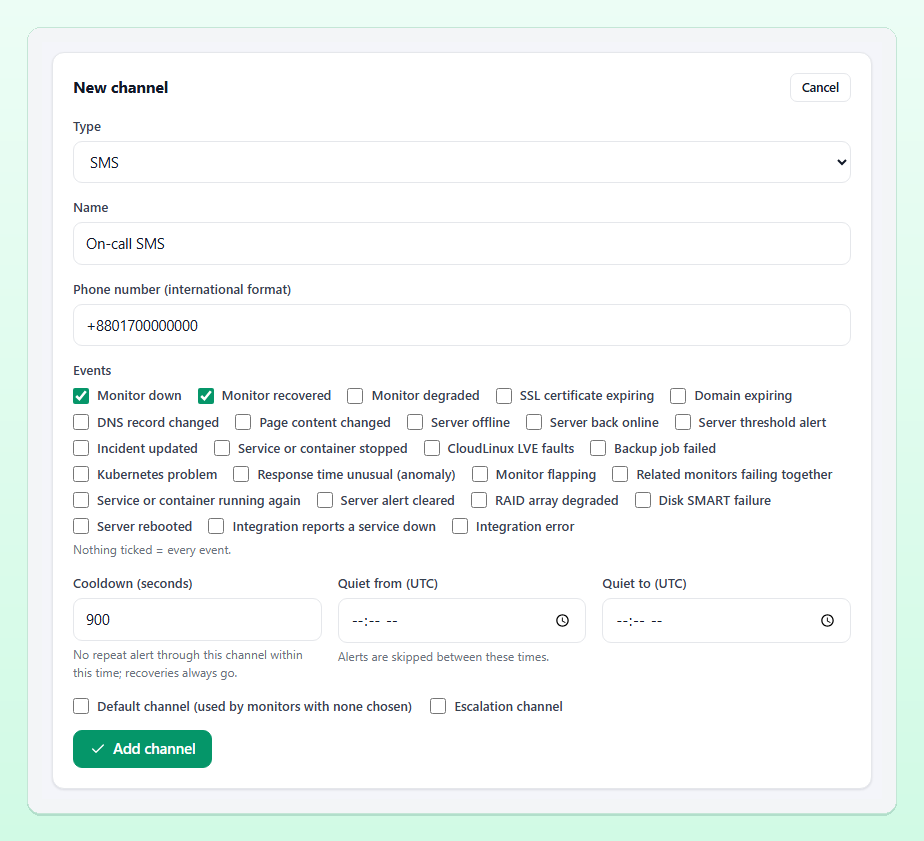
- Open Alert channels and click Add channel.
- In the New channel card, choose SMS as the Type and give the channel a Name, for example "On-call SMS".
- Enter the phone number in international format: a plus sign, the country code and the number, such as
+8801711223344. Spaces and dashes are ignored. - Under Events, tick only what deserves a text. For most teams that is Monitor down and Monitor recovered. Leaving every box empty means every event.
- Set Cooldown (seconds), for example 900, so a monitor that keeps failing cannot send a burst of texts.
- Optionally set Quiet from (UTC) and Quiet to (UTC), and tick Default channel or Escalation channel as explained below.
- Click Add channel, then use Test to send a sample message straight away.
Finally, attach the channel to your monitor: edit the monitor and tick it in the Alert channels card. A monitor with nothing ticked uses the organisation's default channels instead.
What the text message looks like
The built-in SMS text combines the alert title and message, shortened to 140 characters, followed by a link to the monitor. A down alert reads roughly like this:
🔴 DOWN: Shop homepage - Shop homepage (https://shop.example.com) is down: HTTP 503 ... https://your-monitor.example/app/monitors/12The operator can edit the wording of every SMS through message templates, which also count the length, the encoding and the number of SMS parts. That matters for one practical reason: a text in plain English letters (GSM-7) fits 160 characters in one part, while a text with characters outside that set, such as Bengali script, is sent as Unicode and fits only 70 characters per part. Longer or Unicode messages cost more parts. The RT Communications connection sends Bengali text as Unicode automatically.
Keeping SMS costs and noise under control
A badly tuned SMS channel is expensive and, worse, teaches people to ignore their phone. Five settings prevent that.
Confirmations on the monitor
Set Confirmations to 2 or 3 so one failed check never sends a text. With several locations, the same setting means several places must see the failure. The guide to reducing false alerts goes deeper.
Events
Keep certificate expiry, content changes and DNS changes for e-mail or chat. They are important, but rarely urgent enough for a text at 3 a.m.
Cooldown
After a message is sent through the channel, further monitor alerts to it are skipped for the cooldown period and logged as skipped: cooldown. Recoveries always go through, so you still learn when the site is back.
Quiet hours
Inside the quiet window the channel is skipped, except for recoveries. Times are in UTC: Bangladesh time is UTC+6, so 23:00 to 07:00 in Dhaka is 17:00 to 01:00 UTC. Keep at least one channel without quiet hours for the alerts that must wake someone.
Maintenance windows and grouping
During a maintenance window no channel is notified, and the intelligence layer holds back alerts from flapping monitors and groups monitors that fail together into one notice. Both save texts without hiding anything: the alerts and incidents are still recorded.
SMS as the escalation step
Many teams send every down alert to chat first and use SMS only when nobody reacts. Tick Escalation channel on the SMS channel and set Escalate after (minutes) in the Escalation card on the same page. When a monitor incident is still open and unacknowledged after that many minutes, the escalation channels receive an "ESCALATION: ... still down" message, once per incident. Acknowledging the incident, as described in the incidents documentation, stops it. This keeps SMS volume low while making sure a real outage never goes unnoticed. The alerts documentation describes escalation, cooldowns and quiet hours in full.
SMS alerts in Bangladesh
For teams in Bangladesh a few details are worth knowing:
- Enter mobile numbers with the country code:
+880followed by the number without its leading zero, so01711223344becomes+8801711223344. A local number typed without the plus sign, such as01711223344, is completed with the installation's default country code. - The platform can deliver through RT Communications, a Bangladeshi SMS gateway, when the operator has chosen it; a local gateway with an HTTP interface can also be connected as a custom gateway.
- Bengali text is supported but uses more SMS parts per message, as explained above. The template editor shows the encoding and the part count while the operator types, which makes it easy to keep alerts short.
Using SMS alongside other channels
SMS works best as one channel among several. A common layout looks like this:
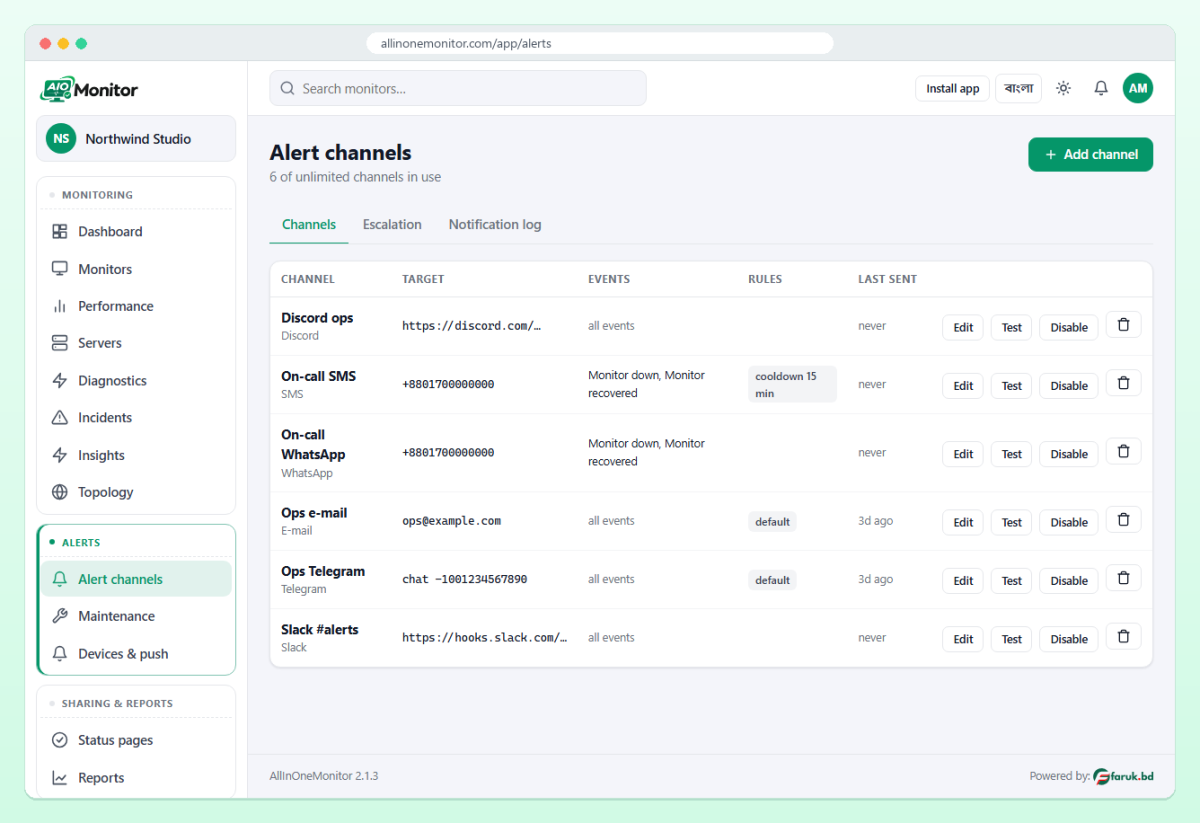
- E-mail as the default channel, for every event and a searchable record.
- Slack, Discord or Telegram for the team's live view.
- SMS for down and recovery events on the monitors that matter most, or as the escalation channel.
- WhatsApp where your team prefers it; see our guide to WhatsApp alerts for website monitoring.
If a text does not arrive, open the channel: its delivery log shows each attempt as sent, failed with the provider's answer, or skipped with the reason. Failed deliveries are retried with back-off before they are given up.
Frequently asked questions
Can I get an SMS when my website is down without installing an app?
Yes. An SMS channel sends a normal text message to any mobile phone, so nothing has to be installed and no data connection is needed.
Will I also get an SMS when the site comes back up?
Yes, if the channel takes the Monitor recovered event. Recoveries are sent even during a cooldown or quiet hours, and the message includes how long the site was down.
Which phone number format should I use?
International format: a plus sign, the country code and the number, for example +8801711223344 for Bangladesh. Spaces and dashes are ignored.
How do I stop getting too many SMS alerts?
Raise Confirmations on the monitor, limit the channel's Events to down and recovery, and set a Cooldown. Quiet hours and escalation-only SMS reduce the volume further.
Get a text the moment your site goes down
Create a monitor, add an SMS channel and test it in under five minutes. You will know about the next outage before your customers tell you.