

To monitor a website from multiple locations, you run the same check from several places on the internet and compare the answers. If every location fails, the site is down; if only some fail, you have a regional outage; if only your own monitoring server fails, it was probably its network, not your site. AllInOneMonitor does this with its main server plus probes that the operator registers, chosen per monitor in the Locations card.
Key takeaways
- One location cannot tell "my site is down" apart from "the path from this checker is broken".
- With several locations, AllInOneMonitor reports Up, Down or Degraded, and Degraded is how a regional outage shows up.
- Locations are the Main server plus probes registered by the operator; how many you can pick depends on your plan.
- Location pools and automatic failover keep checks running when a probe goes offline.
- If your visitors are in Bangladesh, or any one country, check whether a probe there is listed, and use Diagnostics to compare what each location sees.
Why a single location is not enough
Every check travels a path: from the monitoring server, through its provider, across one or more transit networks, to your host. A failure anywhere on that path looks the same as a failure of your site. With one location you get two kinds of mistakes:
- False alarms. The monitoring server's own provider has a routing problem for a few minutes, and you are woken up for an outage none of your visitors saw.
- Missed outages. Your site is unreachable for visitors on one continent, or on one large ISP, while the single checker, sitting somewhere else, keeps reporting Up.
The second case matters more than many teams expect. A content delivery network edge can fail in one region, a DNS answer can differ by geography, and a submarine cable or an international gateway problem can cut off one country while the rest of the world sees nothing. Global website monitoring is about seeing those differences instead of averaging them away.
How monitoring locations work in AllInOneMonitor
There are two kinds of location:
- The Main server, the platform itself (stored as
core). It runs checks for every monitor that has no other location. - Probes: small programs that run on other machines, pull check jobs from the platform, run them with the same check code and push the results back. They need only outbound HTTPS, nothing inbound. Probes are added by the platform's operator, who gives each one a name, region, country and city and decides whether customers may pick it.
You see the result on the monitor form. The Locations card lists the Main server and every probe offered to customers, labelled with its name, city and country, and its header shows how many you may tick on your plan.
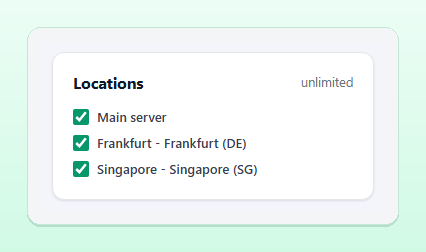
If your plan allows one location, the card says so and the Main server does the checking. Plans with more locations let you tick several; the pricing page shows what each plan includes.
How several results become one status
Each result is stored with the location that produced it. With more than one location, the newest result of each location from the last two intervals is compared, and the Confirmations field changes meaning: it becomes the number of locations that must see the failure.
| What the locations report | Monitor status | What happens |
|---|---|---|
| All up | Up | Nothing; any open incident is resolved |
| At least Confirmations locations down (or all, if there are fewer) | Down | A major incident opens and your alert channels are notified |
| Some down, but fewer than Confirmations | Degraded | A minor incident opens and the bell and webhooks are told |
With three locations and Confirmations set to 2, a problem seen from one place only is recorded as Degraded, and a problem seen from two or three places pages you. That single setting removes most false alarms caused by one checker's network, a topic we cover in more depth in how to reduce false alerts.
Tip: Degraded is sent to the bell and to webhooks, but not to your alert channels unless the monitor's alert_degraded option is on (it can be set through the API). Leave it off for most monitors, and turn it on for the ones where a regional outage costs you real customers.
Location pools and failover
Naming fixed probes is not the only option. When the operator runs probes with a region, the monitor form also shows a Location pools card:
- Any probe in a region: each check runs on the least busy online probe of that region. A region pool counts as one location of your plan.
- Automatic spread: each check runs on probes from N different regions, chosen per check. It counts as N locations.
Failover is built in. When a fixed probe goes offline or is taken out of service for maintenance, its checks move to another online probe of the same region, or to the Main server if the region has none, so the monitor never silently stops. Results always keep the code of the probe that really ran the check, so the history stays truthful. The probes documentation describes the full rules.
Reading results by location
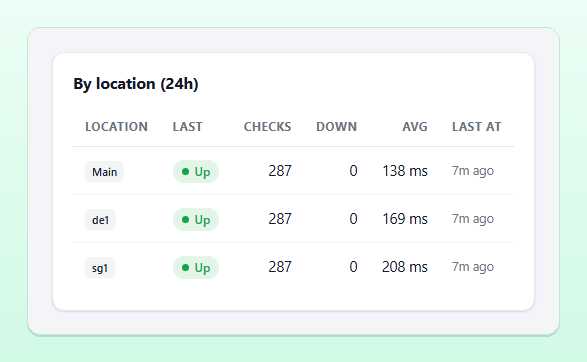
On a monitor's page, the By location (24h) card lists every location that checked it in the last day: its latest status, the number of checks, how many were down, the average response time and when it last ran.
Once results come from at least two locations, the Regions and networks card adds a comparison by location, by network (ISP and ASN) and by region, with failure percentages and p95 response times. It also writes a short note when the pattern is clear: a Regional problem when only one region fails, or an ISP-specific problem when only probes on one provider's network fail. Response times differ by location too, simply because of distance; our response time monitoring guide explains how to read them.
Monitoring a website for visitors in Bangladesh
If most of your customers are in Bangladesh, the question "is my site up?" really means "is it up for people on Bangladeshi networks?". Traffic between local ISPs often stays inside the country, while traffic to servers abroad crosses international links, so a site hosted in Europe can be fine for the world and slow or unreachable from Dhaka, or the other way round for a site hosted locally.
Here is how to approach it honestly with AllInOneMonitor:
- Check the Locations card. Every probe offered to customers is listed with its country. If one in Bangladesh (or close to it) is there, tick it next to a location in another region.
- If none is listed, ask the operator. Probes are added by the operator of the platform. A probe is a small PHP program that runs on almost any VPS with outbound HTTPS, so adding one in a specific country is a practical request, not a special build.
- Use a region pool or automatic spread where available, so you get a view from more than one part of the world even without naming probes.
- Compare from several places when something looks wrong. Diagnostics, described below, shows what each location sees at the same moment.
Avoid the opposite trap as well: a monitor that only runs from inside one country will not tell you when the rest of the world cannot reach a locally hosted site.
Diagnosing a regional outage
When a monitor is Degraded, open Diagnostics in the menu. Choose a tool (Ping, Traceroute, MTR, DNS lookup or HTTP timing), enter the host of one of your monitors, tick the Main server and the probes you want, and press Run. The answers appear side by side as each location reports. A traceroute that stops at the same network from two locations, or a DNS lookup where the answers differ between locations, usually tells you where to look. The Regions and networks card links straight to a traceroute from several locations with the host filled in. Details and limits are in the diagnostics documentation.
Frequently asked questions
How many locations should a website be monitored from?
Three is a practical number for most sites: enough to tell a regional problem from a full outage when Confirmations is set to 2. How many you can pick depends on your plan.
Does AllInOneMonitor have a monitoring location in Bangladesh?
Locations are the Main server plus the probes the operator has registered, and the Locations card on the monitor form lists them with their country. If none is in the country you need, the operator can register one, since a probe runs on an ordinary VPS.
What does Degraded mean?
Some locations see the monitor fail, but fewer than your Confirmations setting. It usually points to a regional or network-specific problem rather than a full outage.
What happens if a probe goes offline?
Its checks move to another online probe in the same region, or to the Main server, so monitoring continues without gaps.
See your site the way the world sees it
Create a monitor, tick the locations your plan allows, and let AllInOneMonitor tell a real outage from a regional one.